
Bible Path: Prayers & Widgets
Deep Flow AppsBooks & Reference
4.8402.00 Reviews
- Version
- 2.6.1
- Installs
- 1.00M
- Age Rating
- Everyone
Screenshots



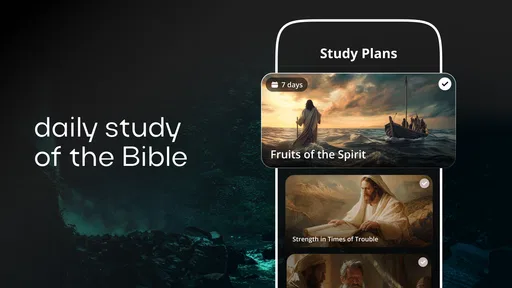
Our Review of Bible Path: Prayers & Widgets
 Analysis by Appyee
I like the idea behind Bible Path: Prayers & Widgets: it puts short moments of reflection within reach without asking me to turn every quiet minute into a formal study session. The combination of devotional material, home-screen widgets, Bible listening and faith-related video gives it a more everyday feel than a reference app I open only when I need to look something up. I see its strongest use as a gentle prompt to return to scripture and prayer during an ordinary day, rather than as a replacement for a Bible, a church community or a focused study resource.
What the app offers in practice
As a Books & Reference app from Deep Flow Apps, Bible Path brings several kinds of spiritual content together. Its current version is 2.3.1, and it is free to download, with optional in-app purchases ranging from $4.99 to $49.99 per item. It is rated for Everyone and supports Android 6.0 and later. Those details make it accessible to a broad range of users, though the optional purchases are worth keeping in mind if you prefer to use only free content.
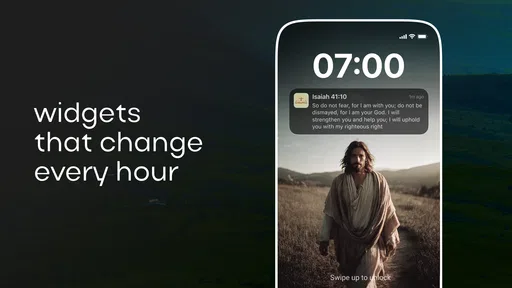
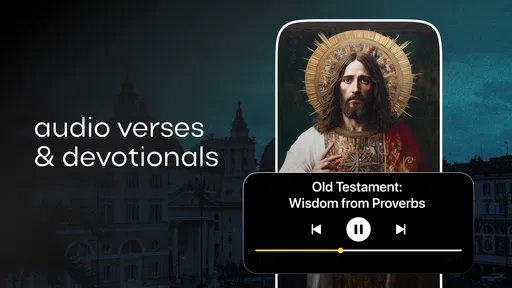
The app’s central appeal is variety: daily devotional material and hourly verses can make scripture a recurring part of the day, while listening to the Bible gives people another way to engage when reading is inconvenient. Holy-story videos add a visual option. I would treat these formats as different entry points, not as interchangeable substitutes: a short verse can prompt reflection, listening suits hands-free moments, and a video may be more approachable when you want a story presented visually.
That range also means it can fit around routines instead of demanding a new one. I might glance at a verse while waiting for a meeting to begin, listen while doing a simple household task, then return to a devotional when I have enough time to concentrate. The useful question is not whether every format is necessary, but which one genuinely helps you make room for faith. Choosing one or two regular touchpoints is likely to feel more sustainable than trying to consume everything the app offers.
How I would build a useful routine
Widgets are most helpful when they support a habit rather than add another notification to ignore. I would place a verse widget somewhere I naturally look during the day, then use it as a cue to pause for a few seconds. If a particular verse or prayer matters to me, bookmarking it gives me a way to return without relying on memory or scrolling through material again. That small workflow—notice, reflect, save—can make a brief encounter more meaningful than reading a stream of verses without stopping.
Hourly verses could suit someone who welcomes frequent reminders, but that cadence will not be right for everyone. If repeated prompts start to feel like background noise, I would reduce interruptions or focus on the widget instead. A home-screen item is a quieter approach: it is there when you choose to look, rather than pulling your attention away at a set moment. For people who already feel overloaded by phone alerts, that distinction matters.
A realistic routine might be to check a devotional with breakfast, listen to a passage during a low-attention chore, and return to a saved prayer in the evening. I would avoid trying to read while driving or doing anything that needs full attention; audio is the more suitable format for hands-free listening, and even then it should not distract from safety. The point is to fit spiritual reflection into moments that are genuinely available, not to force it into every gap.
Who will get the most from it
I think Bible Path is best for people who want a light, approachable way to keep scripture present throughout the day. It may especially suit someone who enjoys short devotional prompts, likes seeing a verse on the home screen, or sometimes prefers listening and video to reading. Newer readers may appreciate having several ways into the material, while established readers could use it as a companion for brief pauses between longer study sessions.
It is less suited to someone looking for a strictly text-focused Bible tool or a detailed research environment. If your main priority is comparing translations, tracing references, or working through a structured academic study, a dedicated Bible study app or print reference may serve you better. Likewise, people who want a quiet, uninterrupted reading experience may prefer an app that concentrates on the Bible text rather than combining devotionals, widgets, audio and video.
The social and personalization elements can also be a matter of taste. A community feature may feel encouraging to someone who wants to share reflections, but it is not essential to getting value from personal prayer or scripture. I would not assume that every user needs to participate in groups. It is perfectly reasonable to use the app privately and focus on the parts that support your own practice.
The First Impressions
When I first opened Bible Path: Prayers & Widgets, I was greeted by a clean and intuitive interface. It’s designed to be super user-friendly, so even if you're not tech-savvy, you’ll find your way around without a hitch. The colors are soothing, and the layout is straightforward, making it easy to navigate through the features.
Diving into the Features
Let’s talk features because this app is packed with some really cool ones. First up, the prayer library. It’s like having a spiritual bookshelf at your fingertips. You can browse through an extensive collection of prayers for different occasions. Whether you’re seeking comfort, guidance, or simply want to express gratitude, there’s a prayer for that. And trust me, it’s a game-changer.
Next, the widgets. Oh, how I love these! You can choose from a variety of widgets to display on your home screen. They feature daily verses or prayers, acting as gentle reminders of faith throughout the day. It’s like having a virtual nudge that keeps your spiritual life refreshed and energized.
Personalization and Customization
One of the standout aspects of the app is its personalization options. You can tailor the experience to suit your preferences. From changing themes to selecting your favorite prayers, it’s all about making it your own. The app also allows you to bookmark prayers and verses, so you can easily return to them whenever needed. It’s these little touches that make the experience so personal and engaging.
For me, bookmarking is more than a convenience. It can turn an app from a source of passing prompts into a small personal collection: a prayer for a difficult day, a verse I want to think about later, or material I plan to revisit during a quieter moment. I would use those saved items selectively, though. A short list of meaningful entries is easier to return to than a large collection saved simply because the option is available.
Staying Connected
The app doesn’t just stop at prayers and widgets; it also fosters a sense of community. You can join prayer groups, share your thoughts, and connect with others on similar spiritual journeys. It’s heartwarming to see how technology can bring people together in faith, offering support and encouragement along the way.
Another cool feature is the daily notifications. They gently remind you to take a moment for reflection, prayer, or meditation. It’s easy to get caught up in the hustle and bustle of daily life, but these notifications are like a friend tapping you on the shoulder, reminding you to pause and breathe.
I would approach notifications as a tool to tune, not a commitment to accept every prompt. A reminder can be helpful when it meets a natural break in the day; repeated alerts at inconvenient times can make a reflective practice feel like another task. If you already have a prayer routine, the widget may be enough. If you are trying to establish one, a notification can act as a starting cue, then be adjusted once the habit becomes familiar.
Practicality Meets Spirituality
Let’s be honest; we’re all trying to juggle a million things at once. That’s why having an app like this is so handy. It seamlessly blends practicality with spirituality, making it easier to incorporate faith into your daily routine. Whether it's during a coffee break or your morning commute, you have a moment of peace and reflection right there in your pocket.
And for those who love to dig deeper, the app offers Bible study guides and devotional plans. It’s like having a personal study partner who’s always up for enhancing your understanding and connection to the scripture.
I would use a devotional plan as a framework for continuity, while keeping a separate place for deeper notes or study if that is important to me. Short guided material can help me decide what to reflect on next, but it should not be mistaken for a comprehensive study workflow. The distinction is useful: Bible Path can help make a regular practice easier to begin, while a dedicated study resource may be better for sustained research and detailed cross-referencing.
How it compares with other Bible apps
Many Bible apps are built around searchable scripture, reading plans or reference tools. Bible Path’s appeal is more about keeping devotional content close at hand through widgets and reminders, while also offering listening and video formats. That makes it a plausible companion to a traditional Bible app: use one for a quick prompt or audio session, and another when you need to locate a passage, compare text or study in depth.
Compared with a printed devotional, the phone-based approach is more convenient when you are away from home and can bring a verse to the surface without carrying a book. The trade-off is that the same device contains messages and other distractions. If a screen tends to pull you away from quiet reflection, a physical Bible or prayer journal may be the better choice. I would choose the format that helps me pay attention, not assume the most digital option is automatically the most useful.
One practical way to prevent the app from becoming just another feed is to decide in advance what each format is for. I might use the widget for a brief reminder, the prayer library when I need words to begin with, and audio when reading is inconvenient. Keeping those roles distinct makes the mix feel purposeful. It also helps answer a common question: you do not need to use every feature to benefit from the app; a single well-chosen part can be enough.
What to keep in mind before installing
Bible Path has an average rating of 4.8 from around 53,000 ratings, and it has been installed over a million times. That suggests it has reached a sizeable audience, but popularity alone cannot tell me whether its style will fit your beliefs, preferred Bible translation, or daily habits. I would try the free experience with a clear idea of what I want from it before considering any optional purchase. In-app items range from $4.99 to $49.99, so it is sensible to check what a purchase covers and whether it adds something you will actually use.
The app was released on August 2, 2024, and the present version is 2.3.1. Those facts give a useful point of reference for its current state, but they do not tell me what future changes will bring. For existing users, the practical test is whether the current combination of devotional content, widgets and media continues to support their routine. I would pay attention to whether the features I rely on remain convenient and whether any changes make it easier or harder to keep a calm, personal rhythm.
When deciding whether to keep it, I would ask myself a few grounded questions: Do I actually notice and use the widget? Are the reminders welcome, or do I dismiss them automatically? Does listening or watching help me engage, or do I prefer reading quietly? Am I looking for a devotional companion or a complete study library? The answers matter more than the number of features. If the app helps me return to a thoughtful moment without adding friction, it has earned its place; if I need deeper tools or fewer digital interruptions, another approach may suit me better.
Final Thoughts
If you’re looking for an app that not only enriches your spiritual life but also fits seamlessly into your modern lifestyle, Bible Path: Prayers & Widgets is a must-try. It’s thoughtfully designed, packed with features, and truly brings faith into the digital age. Whether you’re a seasoned believer or just starting your spiritual journey, this app offers something valuable for everyone.
So, why not give it a whirl? You might find it’s just what you need to keep your faith vibrant and alive, wherever life takes you.
Privacy and Permissions
See what permissions an app requests and how it handles your data.
- Photos/Media/Files
- read the contents of your USB storage, modify or delete the contents of your USB storage
- Storage
- read the contents of your USB storage, modify or delete the contents of your USB storage
- Camera
- take pictures and videos
- Wi-Fi connection information
- view Wi-Fi connections
- Other
- view network connections, full network access, run at startup, control vibration, prevent device from sleeping, Google Play license check, read Google service configuration
Verdict
Strengths of Bible Path: Prayers & Widgets
- Intuitive and easy-to-navigate interface.
- Wide range of prayers for all occasions.
- Customizable widgets for quick access.
- Offline access to scriptures and prayers.
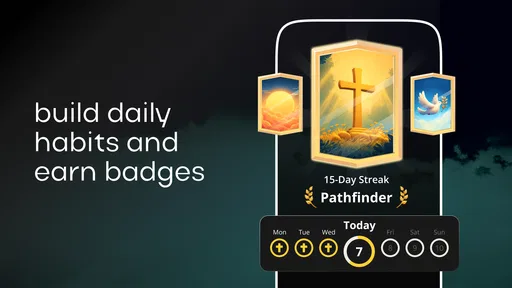
- Daily reminders to encourage consistent use.
Limitations of Bible Path: Prayers & Widgets
- Limited language options for non-English users.
- Some features require in-app purchases.
- Occasional ads may interrupt usage.
- Widgets can be slow to update content.
- Lacks social sharing options for prayers.
Other Releases by Deep Flow Apps
View All
Learn English, Spanish: Learna
Education4.6

IQ Masters - Brain Games
Education4.2

Nerd AI - Tutor & Math Helper
Education4.6

Retake AI: Face & Photo Editor
Photography3.7
Similar Picks in This Category
View All
Google Play Books & Audiobooks
Google LLC4.7

네이버 - NAVER
NAVER Corp.3.5

Wattpad - Read & Write Stories
Wattpad.com3.7

King James Bible - Verse+Audio
Ozion4.8

Bible Offline-KJV Holy Bible
Bíblia Offline4.9

Amazon Kindle: Reading App
Amazon Mobile LLC4.8
Frequently Asked Questions
What is Bible Path: Prayers & Widgets and how does it work?
Bible Path: Prayers & Widgets is a mobile application that offers users a comprehensive platform to explore the Bible, daily prayers, and devotionals. It provides interactive widgets for your home screen, allowing easy access to scriptures and prayer reminders. The app is designed to enhance your spiritual journey by offering a personalized experience.
Is Bible Path: Prayers & Widgets free to use or does it require a subscription?
The app is free to download and offers basic features at no cost. However, it includes optional in-app purchases and subscription plans that unlock premium features such as ad-free usage, exclusive devotional content, and advanced customization options for widgets. Users can choose a plan that suits their needs.
What devices are compatible with Bible Path: Prayers & Widgets?
Bible Path: Prayers & Widgets is available for both Android and iOS devices. It requires Android version 5.0 or later and iOS version 11.0 or later. The application is optimized for both smartphones and tablets, ensuring a seamless experience across different device types and screen sizes.
How can I customize the widgets in Bible Path: Prayers & Widgets?
Customization is one of the key features of Bible Path: Prayers & Widgets. Users can personalize widgets by selecting different themes, choosing specific scriptures or prayers to display, and setting reminders for daily devotional practices. This ensures that your spiritual tools are always aligned with your personal preferences.
Does Bible Path: Prayers & Widgets offer offline access to its content?
Yes, Bible Path: Prayers & Widgets offers offline access to its content, including scriptures and selected prayers. Once downloaded, users can access their favorite passages and devotionals without needing an internet connection, making it convenient for use during travel or in areas with limited connectivity.
